

A persistent orange light on your BT Home Hub can be frustrating, but it’s often a solvable issue. This guide will walk you through the common causes and solutions to get your internet back up and running.
Understanding the Orange Light
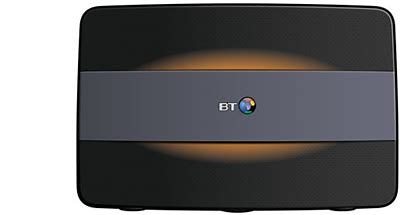
Before diving into troubleshooting, it’s essential to understand what the orange light signifies. Generally, a solid orange light indicates a problem with the internet connection, while a flashing orange light often means the hub is attempting to connect.
Common Causes and Solutions
Hub Restart:
This is the simplest solution and often resolves minor issues.
Locate the reset button on your hub (usually on the back).
Press and hold the reset button for about 10 seconds until the hub restarts.
Wait for the lights to stabilize and check if the issue is resolved.
Check Cable Connections:
Ensure all cables are securely connected to the hub and your broadband connection point.
Check for any loose or damaged cables.
Try swapping the Ethernet cable connecting your computer to the hub to rule out a cable issue.
BT Service Outage:
Check BT’s service status page or contact their customer support to see if there’s a known outage in your area.
Hub Firmware Update:
Outdated firmware can sometimes cause issues.
Check the BT website for firmware updates for your specific hub model.
Router or Modem Issues:
If you’re using a separate router or modem, try bypassing it and connecting your devices directly to the BT Home Hub. This can help isolate the issue.
Power Cycle Your Devices:
Turn off your router, modem, and all connected devices.
Check for Overheating:
If your hub is overheating, it might malfunction. Ensure it’s in a well-ventilated area and not obstructed by other devices.
Contact BT Support:
If none of the above solutions work, it’s time to contact BT’s customer support for further assistance. They can diagnose the problem and provide specific guidance.
Additional Tips
Try a different Ethernet port:
If you’re using a wired connection, try plugging your device into a different Ethernet port on the hub.
Check for malware or viruses:
Malware can sometimes interfere with your internet connection. Run a scan with your antivirus software.
Disable Wi-Fi temporarily:
If you’re experiencing issues with Wi-Fi, try disabling it temporarily to see if it resolves the problem.
Remember:
If you’ve recently made changes to your network setup, such as adding new devices or changing security settings, reverting those changes might help.
By following these steps, you should be able to resolve most orange light issues on your BT Home Hub. If the problem persists, don’t hesitate to contact BT support for further assistance.
FAQs
What does a solid orange light on my BT Home Hub mean?
A solid orange light typically indicates a problem with your broadband connection. It could be an issue with the hub itself, your line, or a wider network problem.
What does a flashing orange light on my BT Home Hub mean?
A flashing orange light usually means your hub is trying to connect to the internet. It should turn blue when connected successfully.
How long should it take for the orange light to turn blue?
It should take a few minutes for the connection to establish. If it takes longer, there might be a problem.
Is there a specific reason why my BT Home Hub has an orange light?
There could be several reasons, including a faulty cable, a power issue, a problem with the hub itself, or a wider network outage.
What can I do if my BT Home Hub has a solid orange light?
Check all cables, restart the hub, and try connecting a device directly to the hub to isolate the issue. If the problem persists, contact BT support.
What should I do if my BT Home Hub has a flashing orange light that won’t turn blue?
Wait a few minutes, then try restarting the hub. If the problem continues, check for service outages in your area or contact BT support.
Can I fix the orange light issue myself?
In some cases, you can resolve the issue by checking cables, restarting the hub, or performing a factory reset. However, for persistent problems, contacting BT support is recommended.
How do I reset my BT Home Hub?
The reset button is usually located on the back of the hub. Press and hold it for about 10 seconds until the lights turn off and then back on.
Will resetting my BT Home Hub erase my Wi-Fi settings?
Yes, resetting the hub will erase your Wi-Fi settings, so you’ll need to reconfigure them after the reset.
What should I do if resetting the hub doesn’t fix the orange light?
Contact BT support for further assistance. They can diagnose the problem and provide specific troubleshooting steps.
Can a power outage cause an orange light on my BT Home Hub?
Yes, a power outage can disrupt the connection and cause the orange light to appear. Try restarting the hub after the power is restored.
Is there a BT Home Hub status checker?
BT provides a service status checker on their website where you can check for any known issues in your area.
Can a faulty cable cause an orange light on my BT Home Hub?
Yes, a damaged or loose cable can prevent a stable connection. Inspect all cables for any signs of wear and tear.
Can too many devices connected to the BT Home Hub cause problems?
While having too many devices might slow down your internet connection, it shouldn’t cause a solid orange light.
Should I unplug other devices while troubleshooting the orange light?
Unplugging other devices can help isolate the issue. If the problem persists after unplugging other devices, the issue is likely with the hub or your internet connection.
Can a faulty BT Home Hub cause an orange light?
Yes, a faulty hub can be the cause of the problem. Contact BT support for replacement options.
How can I prevent future orange light issues?
Keep your hub in a well-ventilated area, avoid overloading it with devices, and regularly check for cable damage.
Can I use my mobile phone as a hotspot while troubleshooting the BT Home Hub?
Yes, you can use your mobile phone as a hotspot while you troubleshoot the issue.
Is there a BT Home Hub app that can help with troubleshooting?
BT might offer a mobile app with troubleshooting tools. Check the BT website or app store for availability.
To read more click here
